

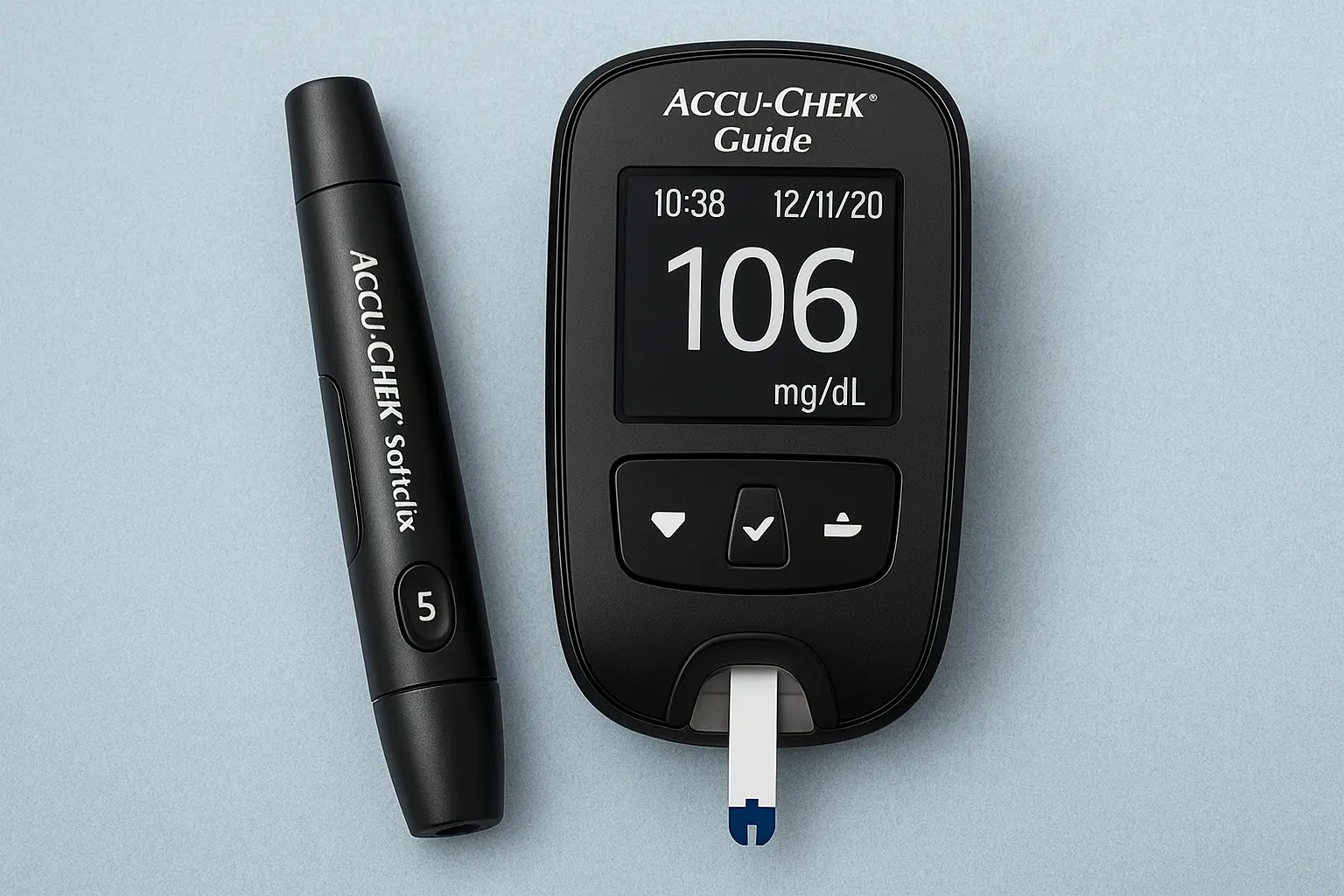
Introduction to Accu-Chek Guide
Living with diabetes often means constantly checking your blood sugar levels — and honestly, that can be overwhelming. But devices like the Accu-Chek Guide have made this process much easier, more accurate, and a lot less stressful. The Accu chek guide, developed by Roche Diabetes Care, has earned a solid reputation for creating reliable blood glucose monitoring systems trusted by people all over the world. Among their lineup, the Accu-Chek Guide stands out because it’s designed not just for precision, but also for comfort and simplicity in daily use.
At its core, the Accu-Chek Guide is all about making life a little smoother for anyone managing diabetes. It helps take away some of that anxiety that comes with testing — the worry of “Did I do it right?” or “Is this reading accurate?” The device provides fast, easy-to-read results and connects to a smartphone app so users can keep track of their progress without juggling paper logs.
Another thoughtful aspect is its design — small, portable, and user-friendly. The test strip vial is spill-resistant (a relief for anyone who’s ever fumbled with strips before breakfast), and the screen lights up for night-time checks. It’s these little details that make a big difference in everyday routines.
In short, the Accu-Chek Guide is not just a gadget — it’s a helping hand for people managing diabetes, empowering them to feel more in control of their health and decisions.
What is the Accu-Chek Guide?
The Accu-Chek Guide is a modern blood glucose monitoring system developed by Roche Diabetes Care, designed to make daily diabetes management simpler, faster, and more accurate. At its heart, it’s a small handheld device that measures blood sugar levels from a tiny drop of blood — but it’s also much more than that. The Guide brings together smart technology, thoughtful design, and digital connectivity, giving users a more seamless and stress-free testing experience.
What sets the Accu-Chek Guide apart is its attention to real-world usability. It’s built for people who live busy lives, those who don’t want to fiddle with complicated settings or messy strips. The test strip vial, for example, is uniquely spill-resistant — meaning you can grab just one strip at a time without the rest tumbling out. It sounds like a small thing, but when your hands are shaky or you’re in a rush, that feature can feel like a lifesaver.
Another major highlight is its wireless Bluetooth connectivity. The Guide syncs automatically with the MySugr app, allowing users to record, track, and analyze their glucose readings on their phone. That means no more scribbling numbers in a notebook or trying to remember what your fasting sugar was two days ago — it’s all right there in your pocket.
This device is ideal for anyone who needs reliable results quickly — whether you’re newly diagnosed, a long-time diabetic, or even a caregiver. It’s accurate, discreet, and consistent, which helps reduce the emotional stress that often comes with daily glucose testing. In short, the Accu-Chek Guide isn’t just another meter — it’s a thoughtful companion in your diabetes care journey.
Key Features of the Accu-Chek Guide
When it comes to managing diabetes, reliability and convenience go hand in hand. The Accu-Chek Guide combines both with a thoughtful range of features designed to make blood glucose testing smoother and more intuitive. Each element of the device has been crafted around real user experiences — to make everyday testing a little less frustrating and a lot more efficient.
First and foremost, the accuracy of this meter is one of its strongest qualities. It meets and even exceeds many international standards for glucose measurement precision. This means users can trust that what they see on the screen truly reflects their blood sugar level, minimizing the uncertainty that can affect treatment decisions.
Another standout feature is the spill-resistant strip vial, which helps prevent that all-too-common accident of dropping test strips everywhere. The strips themselves are also designed with a wide dosing area, so you can easily apply a small drop of blood without wasting time trying to aim perfectly.
Then there’s the backlit display, which makes testing in dim light — like during late nights or early mornings — so much easier. The Bluetooth connectivity takes things a step further, allowing automatic data transfer to the MySugr app, where results can be tracked, organized, and even shared with healthcare providers if needed.
Additionally, the device has ample memory storage, keeping hundreds of readings so users can monitor trends and spot changes over time. It’s small details like these that make the Accu-Chek Guide stand out as a dependable partner in diabetes management.
In short, its features are all about one thing — making your routine less of a burden and more of a habit that fits naturally into your life.
Smart and Accurate Readings
Accuracy is everything when you’re managing diabetes. A tiny difference in readings can change your next step — whether you eat, adjust your medication, or just take a moment to rest. That’s why the Accu-Chek Guide focuses heavily on delivering smart and accurate readings every time you test. It’s designed to meet strict international accuracy standards (ISO 15197:2013, for example), which ensures that the results stay within a narrow range of your actual blood glucose level.
What makes the readings “smart” isn’t just precision — it’s also the technology behind it. The device uses advanced electrochemical sensors that read blood samples quickly and reduce interference from environmental factors like temperature or humidity. It also has a smart strip design that ensures the correct amount of blood is applied, minimizing the chance of error messages or failed tests.
In daily use, this translates to confidence. You don’t have to second-guess whether your meter is off or your hands were too cold — the Accu-Chek Guide is built to handle small inconsistencies in real-life conditions. Plus, the results appear within a few seconds, displayed clearly on the backlit screen. That might seem like a small detail, but for people who test several times a day, speed and clarity matter more than most realize.
Another understated advantage is consistency. Even after multiple tests, users often find that their readings remain stable and reproducible, which helps build trust in the device over time. Whether you’re at home, at work, or traveling, the Guide adapts to your rhythm without skipping accuracy.
In short, “smart and accurate” isn’t just a marketing phrase here — it’s a real promise backed by thoughtful engineering and user trust.
Spill-Resistant Test Strip Vial
Anyone who’s used traditional glucose meters knows the frustration of spilling test strips all over the place. They’re small, slippery, and once exposed, they can’t really be reused — meaning wasted supplies and wasted money. The Accu-Chek Guide solves this everyday problem with its spill-resistant test strip vial, one of the most practical and appreciated features for users worldwide.
Instead of the usual wide, hard-to-control container, the Accu-Chek Guide’s vial is designed with a narrow opening and special inner ridges that hold the strips neatly in place. When you tip the container, only one strip comes out at a time — no messy pile, no fumbling, and no need to touch multiple strips with your fingers. It’s such a simple improvement, yet it feels revolutionary when you use it for the first time.
This design also keeps the strips protected from humidity and contamination, which helps maintain accuracy. The vial seals tightly to prevent moisture from entering, so your strips stay fresh longer. That matters because even a slight exposure to air or dampness can affect test results — something many people don’t realize until readings suddenly start fluctuating.
From a practical standpoint, this spill-resistant vial makes testing easier for everyone — especially for older adults, those with shaky hands, or people who test frequently in different environments like work or travel. You can even manage it one-handed if necessary.
It’s one of those features you might not notice right away but quickly realize you can’t live without. The simplicity of pulling out just one strip, stress-free, truly captures what the Accu-Chek Guide is all about — making diabetes management easier, cleaner, and more convenient.
Easy-to-Read Backlit Display
If you’ve ever tried to check your blood sugar in low light — maybe early in the morning, during a late-night snack, or in a dimly lit room — you know how frustrating it can be. The Accu-Chek Guide addresses this simple yet important challenge with its easy-to-read backlit display, a feature that adds both comfort and reliability to daily glucose monitoring.
The screen is bright without being harsh, offering clear visibility of your readings at any time of day. The large, bold numbers and high contrast design mean that even users with mild vision problems or older adults can easily read their results without squinting or tilting the screen toward the light. It’s a small thing, but for many, it’s the difference between confidence and confusion when managing diabetes.
In addition to clarity, the display’s intuitive layout shows all the key information at a glance — your current glucose level, time, and indicators for whether the reading is within your target range. There’s no unnecessary clutter, no need to scroll through menus, just straightforward, easy-to-understand results.
Another detail worth noting is that the display automatically adjusts to your environment. Whether you’re testing before bed or outdoors under bright sunlight, the screen remains readable and responsive. And when paired with the MySugr app, readings are mirrored on your smartphone, so you can review your results in even more detail.
This thoughtful design feature makes the Accu-Chek Guide especially practical for users who test frequently and need to rely on their device in any setting. It’s not about flashiness — it’s about accessibility and confidence. You can test whenever and wherever you need to, knowing you’ll get a clear, visible result every single time.
Easy-to-Read Backlit Display
If you’ve ever tried to check your blood sugar in low light — maybe early in the morning, during a late-night snack, or in a dimly lit room — you know how frustrating it can be. The Accu-Chek Guide addresses this simple yet important challenge with its easy-to-read backlit display, a feature that adds both comfort and reliability to daily glucose monitoring.
The screen is bright without being harsh, offering clear visibility of your readings at any time of day. The large, bold numbers and high contrast design mean that even users with mild vision problems or older adults can easily read their results without squinting or tilting the screen toward the light. It’s a small thing, but for many, it’s the difference between confidence and confusion when managing diabetes.
In addition to clarity, the display’s intuitive layout shows all the key information at a glance — your current glucose level, time, and indicators for whether the reading is within your target range. There’s no unnecessary clutter, no need to scroll through menus, just straightforward, easy-to-understand results.
Another detail worth noting is that the display automatically adjusts to your environment. Whether you’re testing before bed or outdoors under bright sunlight, the screen remains readable and responsive. And when paired with the MySugr app, readings are mirrored on your smartphone, so you can review your results in even more detail.
This thoughtful design feature makes the Accu-Chek Guide especially practical for users who test frequently and need to rely on their device in any setting. It’s not about flashiness — it’s about accessibility and confidence. You can test whenever and wherever you need to, knowing you’ll get a clear, visible result every single time.
Memory Storage and Data Tracking
Keeping track of blood glucose readings can be exhausting — especially if you test multiple times a day. Paper logs get lost, numbers blur together, and patterns are easy to miss. That’s why the Accu-Chek Guide’s memory storage and data tracking capabilities are such a game-changer for everyday diabetes management. It’s not just about recording numbers; it’s about helping you understand what those numbers actually mean.
The Accu-Chek Guide can store hundreds of past readings, complete with timestamps and dates, so users can easily look back at their testing history. Whether it’s last week’s fasting levels or last month’s post-meal readings, everything is organized within the meter — ready for review at any time. This feature is particularly helpful for identifying patterns, such as spikes after certain meals or consistently low readings before bed.
When connected to the MySugr app or Accu-Chek Connect, this stored data becomes even more powerful. The app automatically syncs with the device and turns your readings into interactive charts and summaries, offering a clear picture of your blood glucose trends. Over time, you can see how lifestyle changes, medication adjustments, or stress levels affect your results.
Another useful touch is the ability to add personal notes or meal tags alongside readings. For example, you can mark a reading as “before lunch” or “after exercise,” giving context to the numbers. This makes discussions with healthcare providers more precise and productive.
For people living with diabetes, having this level of organization provides a sense of control. You don’t have to rely on memory or guesswork — your Accu-Chek Guide quietly keeps everything in order for you. It’s like having a personal data assistant dedicated to your health, helping you stay one step ahead every single day.
How to Use the Accu-Chek Guide
Using the Accu-Chek Guide is designed to be as easy and stress-free as possible, even if you’re new to blood glucose testing. The device walks you through each step with a user-friendly interface and intuitive design, making the process quick, hygienic, and reliable. Still, it helps to know exactly how to use it properly to get the most accurate results every time.
Start by making sure your hands are clean and dry. Even small traces of food or lotion can affect the test. Open the spill-resistant vial and take out one test strip — notice how easily it comes out without spilling the rest. Insert the strip into the meter; it will automatically power on and display a prompt for a blood sample.
Next, use your Accu-Chek lancing device to prick the side of your fingertip. You only need a tiny drop of blood — about 0.6 microliters. Touch the edge of the test strip to the blood drop, and the strip will draw in the sample automatically. Within seconds, your glucose level appears clearly on the backlit display. You can instantly see whether it’s within your target range.
Once you’re done, simply eject the used strip and dispose of it safely. The meter saves the reading automatically and, if connected via Bluetooth, syncs it directly to your MySugr app. You can even add notes about meals, exercise, or mood right after testing.
A few tips: test at consistent times each day (like before meals and at bedtime), store strips in their vial, and keep your meter in a cool, dry place. The more consistent your testing routine, the more reliable your data will be — helping you and your doctor make smarter treatment decisions.
Connecting the Accu-Chek Guide to the MySugr App
Pairing your Accu-Chek Guide with the MySugr app is one of the smartest things you can do to make your diabetes management easier and more organized. The app acts like a personal assistant that keeps track of every reading, trend, and note — without you having to do anything manually. It’s a bit like having your health journal automatically updated every time you test.
Here’s how it works in simple steps. First, download the MySugr app from the Google Play Store or Apple App Store. Once installed, open the app and create your account. Make sure your phone’s Bluetooth is turned on, then switch on your Accu-Chek Guide. Inside the app, go to “Connections” or “Pair Device,” and select the Accu-Chek Guide from the list. The pairing process usually takes less than a minute — the devices find each other automatically, and once connected, they stay synced unless you unpair them.
From that point forward, every time you check your glucose level, your results instantly appear in the MySugr app. You don’t have to log anything manually — the readings sync wirelessly and are stored securely. Over time, the app starts creating graphs, averages, and insights that help you see your blood sugar trends. You can tag results with notes like “before lunch,” “after workout,” or “stress day,” giving each reading more context.
The app also allows data sharing with healthcare professionals, making it easier to discuss progress during appointments. Plus, you can earn “points” for each test you log — a small motivational touch MySugr uses to keep tracking fun and rewarding.
In short, connecting the Accu-Chek Guide to the MySugr app isn’t just about convenience — it’s about empowering you with knowledge and helping you stay on top of your health effortlessly.
Maintenance and Care of the Accu-Chek Guide
Taking proper care of your Accu-Chek Guide isn’t complicated, but it’s incredibly important. Just like any other medical device, it works best when handled with consistency and care. Regular maintenance not only ensures accurate readings but also extends the life of your meter and accessories — saving you both time and money in the long run.
Start with cleanliness. After each use, gently wipe the meter with a soft, slightly damp cloth. Avoid harsh cleaning agents or alcohol wipes, as these can damage the screen or sensors. Make sure no moisture gets into the test strip port — water and electronics don’t mix well. Once cleaned, let the device air dry before storing it.
For your test strips, storage is key. Always keep them in their original spill-resistant vial, with the lid tightly closed. Strips are sensitive to air and humidity, which can affect accuracy. Never transfer them to another container, and check the expiration date regularly — expired strips can give unreliable results.
The lancing device should also be cleaned occasionally, especially if multiple people use it (though ideally, each person should have their own). Replace the lancet after each use to avoid infections and reduce pain when pricking your finger.
The Accu-Chek Guide uses standard coin cell batteries, which typically last several months depending on usage. The meter will alert you when the battery is running low — simply replace it following the user manual instructions. There’s no need for calibration; the device automatically adjusts itself for optimal accuracy.
Finally, keep your meter stored in its protective case, away from direct sunlight, heat, or moisture. Treat it as a small, valuable medical tool — because that’s exactly what it is. With consistent care, your Accu-Chek Guide will stay dependable, accurate, and ready to help whenever you need it.
Conclusion
Managing diabetes can often feel like a full-time job — constant testing, logging, and adjusting routines. But tools like the Accu-Chek Guide make that process a lot easier and more reliable. It’s not just a glucose meter; it’s a small, intelligent companion designed to support real people in real situations.
What sets the Accu-Chek Guide apart is its combination of accuracy, convenience, and smart connectivity. From its spill-resistant vial and backlit screen to Bluetooth syncing with the MySugr app, every feature has been thoughtfully crafted to make life smoother for people managing diabetes daily. It gives users confidence in their readings, helping them make decisions quickly and accurately — without the guesswork that often comes with older meters.
More than anything, the Accu-Chek Guide represents a step forward in personal health empowerment. It encourages consistency without being intrusive and helps you see your blood sugar trends in ways that actually make sense. Whether you’re newly diagnosed or have been monitoring for years, this device is designed to fit naturally into your lifestyle.
In the end, the goal isn’t just about testing — it’s about living better. And that’s exactly what the Accu-Chek Guide helps you do: stay informed, stay confident, and take control of your diabetes with ease and peace of mind.
FAQs
1. How accurate is the Accu-Chek Guide compared to other meters?
The Accu-Chek Guide meets ISO 15197:2013 standards and often exceeds them. This means its results stay within 10% of a lab reading in most cases, making it one of the most reliable glucose meters available today.
2. Can I use Accu-Chek Guide test strips with other Accu-Chek meters?
No, Accu-Chek Guide test strips are designed specifically for the Guide and Guide Me models. Using them with other Accu-Chek devices may lead to inaccurate readings or errors.
3. How do I pair my Accu-Chek Guide with my phone?
Simply download the MySugr or Accu-Chek Connect app, turn on Bluetooth on your phone, and select “Pair Device.” The app will automatically detect your meter — pairing usually takes less than a minute.
4. What is the warranty period for the Accu-Chek Guide?
Most Accu-Chek Guide meters come with a 5-year warranty, though this can vary slightly depending on your region or retailer. Always keep your purchase receipt for reference.
5. Is the Accu-Chek Guide suitable for children or elderly users?
Yes! The device is user-friendly and designed for people of all ages. Its large display, simple interface, and one-strip vial make it especially helpful for elderly users or those with limited dexterity.